
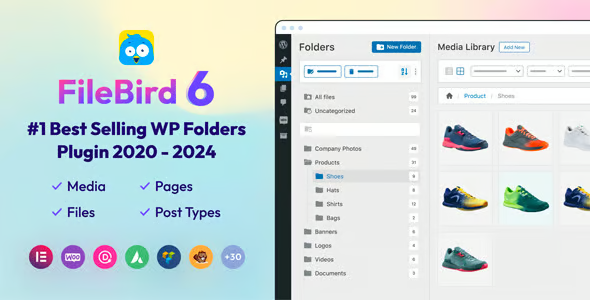

FileBird WordPress Media Library Folders
FileBird WordPress Media Library Folders is a powerful media organization plugin that helps WordPress users manage thousands of files efficiently using a modern folder-based system inside the native media library. Instead of dealing with a cluttered and unorganized upload directory, FileBird introduces a drag-and-drop folder interface that allows you to categorize images, videos, documents, audio files, and other media assets with ease. Designed for bloggers, agencies, WooCommerce stores, and content-heavy websites, FileBird transforms the default WordPress media manager into a professional file organization system optimized for speed, productivity, and workflow efficiency.
WHAT IS FILEBIRD WORDPRESS MEDIA LIBRARY FOLDERS
FileBird WordPress Media Library Folders is a media management plugin for WordPress that allows users to organize media files into virtual folders directly within the WordPress dashboard. The plugin adds a clean drag-and-drop folder structure to the native media library, making it easier to sort, browse, upload, and manage media assets. FileBird also integrates seamlessly with popular page builders and Gutenberg, enabling users to access organized media folders directly while building pages or creating galleries.
KEY BENEFITS OF FILEBIRD WORDPRESS MEDIA LIBRARY FOLDERS
Organize Large Media Libraries: Easily structure thousands of images, videos, and files into folders for faster management.
Save Time with Drag-and-Drop Controls: Move files and folders instantly using intuitive drag-and-drop interactions.
Improve Workflow Efficiency: Access organized media assets quickly while editing posts, pages, WooCommerce products, and builder layouts.
Enhanced Page Builder Integration: Browse organized folders directly inside Elementor, Gutenberg, and other page builders.
Simplify Bulk File Management: Upload, sort, rearrange, and locate files efficiently without navigating cluttered media screens.
FEATURES OF FILEBIRD WORDPRESS MEDIA LIBRARY FOLDERS
Drag-and-Drop Folder Management
Quickly create and organize folders using modern drag-and-drop controls that simplify media management inside WordPress.
Folder Tree Structure
Display media folders in a clean sidebar tree structure for easy navigation and fast access to organized content.
Native WordPress Media Library Integration
FileBird integrates directly into the default WordPress media library without replacing your existing media system.
Specific Folder Upload
Upload files directly into selected folders during the upload process, helping maintain organized file structures automatically.
Page Builder Compatibility
FileBird works seamlessly with:
- Elementor
- Gutenberg
- WPBakery
- Divi
- Beaver Builder
- Other page builders
allowing direct folder browsing while designing pages.
FileBird Gutenberg Gallery Block
Create dynamic image galleries using the dedicated FileBird Gutenberg block that can:
- Display folder-based galleries
- Customize columns
- Enable captions
- Configure image cropping
- Control image linking
Bulk File Organization
Manage large batches of files quickly with:
- Multi-select support
- Bulk drag-and-drop movement
- Fast rearrangement
- Folder-based sorting
Multiple Media Views
Switch between:
- List view
- Thumbnail view
to improve browsing flexibility depending on your workflow preferences.
Sorting & Ordering Controls
Organize files with:
- Ascending sorting
- Descending sorting
- Folder-based arrangement
- Custom media ordering
User-Friendly Modern Interface
FileBird features a clean UI/UX design with intuitive icons, smooth interactions, and lightweight performance optimization.
WooCommerce Media Management
Perfect for WooCommerce stores managing:
- Product galleries
- Variation images
- Downloadable files
- Marketing assets
- Product videos
Lightweight & Fast Performance
The plugin is optimized to work efficiently even with massive media libraries containing thousands of files.
SEO & Workflow Friendly
Keeping media files organized improves content management efficiency and reduces administrative overhead for large websites.
WHO SHOULD USE FILEBIRD WORDPRESS MEDIA LIBRARY FOLDERS
Bloggers & Content Creators: Publishers managing large collections of featured images, videos, and downloadable content.
WooCommerce Store Owners: eCommerce businesses organizing product images, catalogs, and digital assets.
Web Design Agencies: Teams handling media-heavy client websites and complex content structures.
Photographers & Creatives: Professionals organizing portfolios, galleries, and high-resolution image collections.
Business Websites: Companies maintaining structured document libraries, marketing materials, and media resources.
FileBird WordPress Media Library Folders is an essential productivity plugin for WordPress users who need a smarter way to organize and manage growing media libraries. By adding a modern folder system with drag-and-drop functionality directly into WordPress, FileBird simplifies media workflows, improves content management efficiency, and eliminates the frustration of cluttered file libraries. Whether you manage a blog, WooCommerce store, agency website, or multimedia platform, FileBird provides the professional organization tools needed to keep your WordPress media library clean, structured, and easy to navigate.

Reviews
There are no reviews yet.